02. 彻底搞会SpringBoot进阶开发模式
下载 数据请求工具 Postman(发送 post\put\delete 请求)
关注公众号:程序员青戈,回复:**软件 **
下载这个Postman
或者下载 ApiPost 软件,也可以发请求,下载地址:https://www.apipost.cn/
写接口注意事项
- 接口必须定义请求方式,常见的方式有:GET、POST、PUT、DELETE
- 定义接口的路径
- 定义接口方法(返回值和接口参数) 接口参数要注意,使用的是实体类接受还是单个数据
- 新增和更新方法使用是实体类接收数据,删除、查询方法使用的是单个数据
新增数据
注意:数据是** json** 对象格式
返回:ResponseEntity 对象,包含状态码
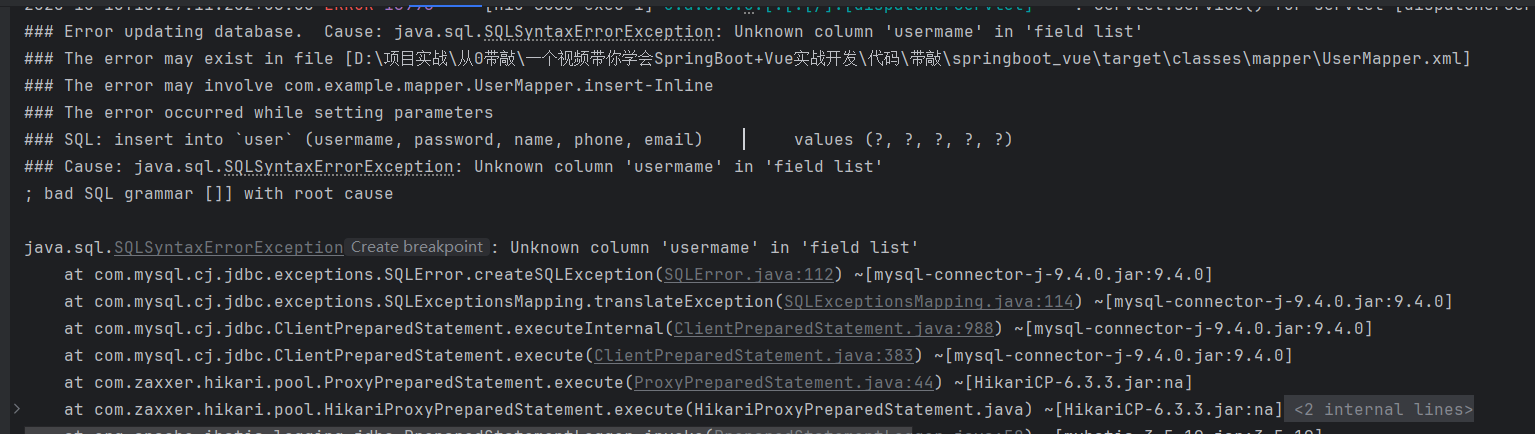
当你的控制台出现错误,一般是 后端写错了,一般是 SQL 问题,检查一下 SQL
新增的接口
/**
 * 新增接口
 */
@PostMapping("/add")
public ResponseEntity<String> add(@RequestBody User user) {
    try {
        userService.add(user);
    } catch (RuntimeException e) {
        return new ResponseEntity<>(e.getMessage() ,HttpStatus.INTERNAL_SERVER_ERROR);
    }
    return new ResponseEntity<>("成功", HttpStatus.OK);
}
新增的 Service
public void add(User user) {
    // 校验账号是否为空
    if (user.getUsername() == null || "".equals(user.getUsername())) {
        throw new RuntimeException("新增失败!账号不能为空!");
    }
    if (user.getPassword() == null || "".equals(user.getPassword())) {
        user.setPassword("123");
    }
    if (user.getName() == null || "".equals(user.getName())) {
        user.setName(user.getUsername());
    }
    User dbUser = userMapper.selectByUsername(user.getUsername());
    // 存在同名的账号
    if (dbUser != null) {
        throw new RuntimeException("新增失败!账号重复!");
    }
    userMapper.insert(user);
}
新增的 Mapper.xml
<select id="selectByUsername" resultType="com.example.entity.User">
    select * from `user` where username = #{username}
</select>

<insert id="insert" parameterType="com.example.entity.User">
    insert into `user` (username, password, name, phone, email)
    values (#{username}, #{password}, #{name}, #{phone}, #{email})
</insert>
使用 postman 模拟发送数据
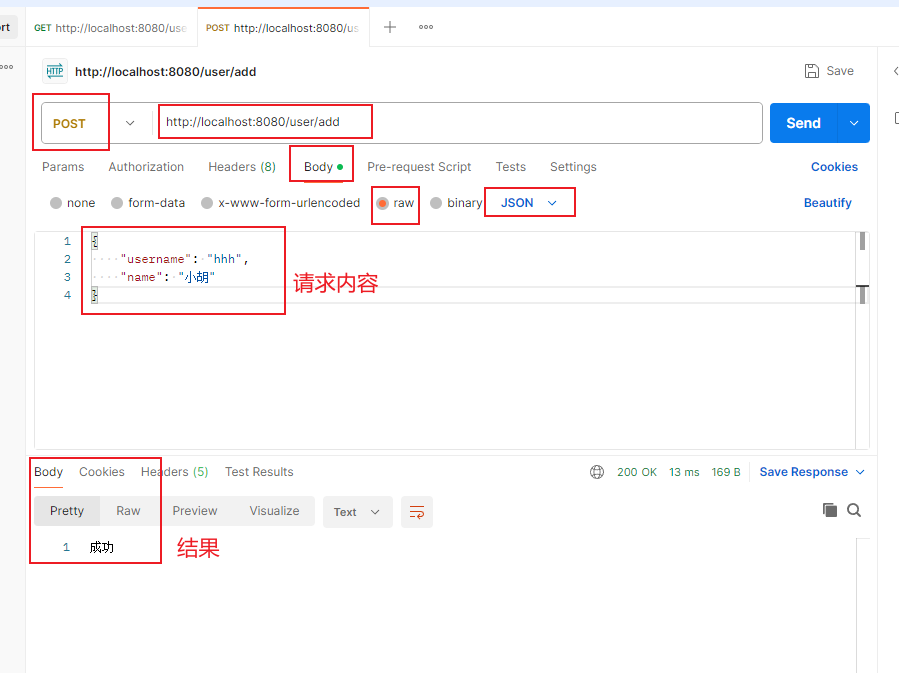
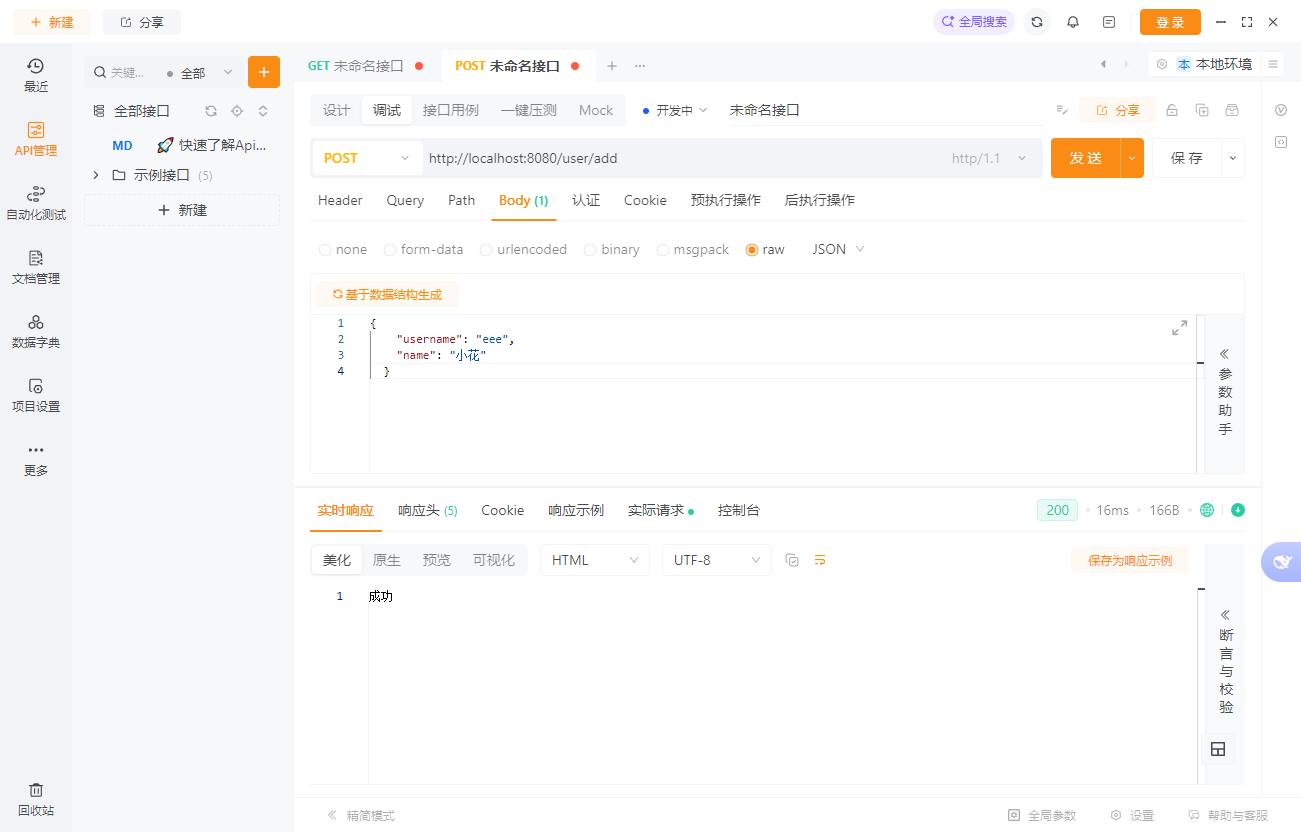
使用 apiPost 测试数据
更新数据
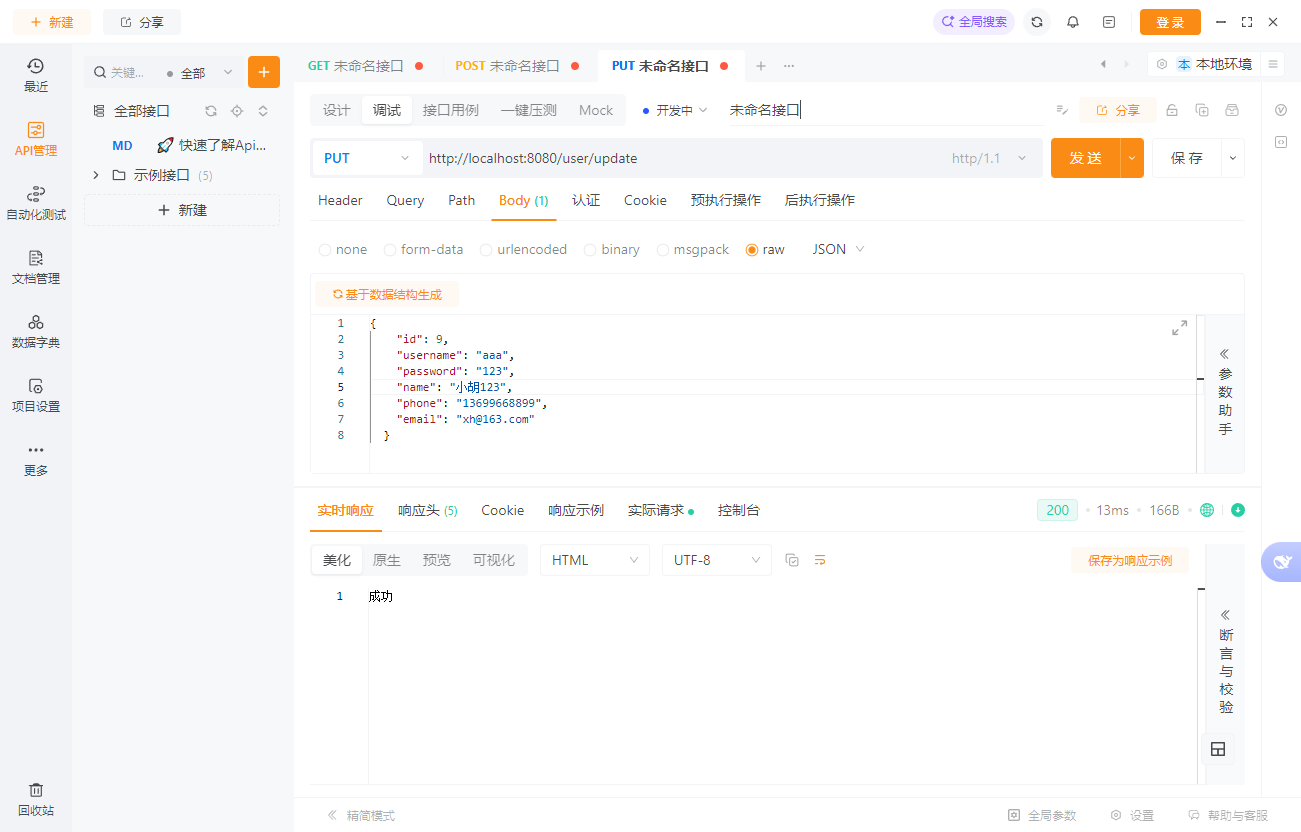
根据唯一的 ID 更新数据
注意:更新数据一定要加上 ID 的条件,否则会出现全表更新,非常危险!
UpdateController
/**
 * 更新接口
 * 更新接口的参数必须携带ID,否则无法更新
 * 我们需要根据ID找到对应的数据库数据  才能更新
 */
@PutMapping("/update")
public ResponseEntity<String> update(@RequestBody User user) {
    try {
        userService.update(user);
    } catch (RuntimeException e) {
        return new ResponseEntity<>(e.getMessage() ,HttpStatus.INTERNAL_SERVER_ERROR);
    }
    return new ResponseEntity<>("成功", HttpStatus.OK);
}
service
public void update(User user) {
    // 校验账号是否为空
    if (user.getId() == null) {
        throw new RuntimeException("更新失败!ID不能为空!");
    }
    userMapper.updateById(user);
}
Mapper.xml
<update id="updateById" parameterType="com.example.entity.User">
    update `user` set username = #{username}, password = #{password}, name = #{name},
    phone = #{phone}, email = #{email}
    where id = #{id}
</update>
使用 apipost 测试数据
删除数据
根据唯一的 ID 删除数据
DeleteController
/**
     * 删除接口
     * @param id 是路径参数,必传
     */
    @DeleteMapping("/delete/{id}")
    public ResponseEntity<String> delete(@PathVariable Integer id) {
        try {
            userService.delete(id);
        } catch (RuntimeException e) {
            return new ResponseEntity<>(e.getMessage() ,HttpStatus.INTERNAL_SERVER_ERROR);
        }
        return new ResponseEntity<>("成功", HttpStatus.OK);
    }
Service
public void delete(Integer id) {
    userMapper.deleteById(id);
}
Mapper.xml
<delete id="deleteById">
    delete from `user` where id = #{id}
</delete>
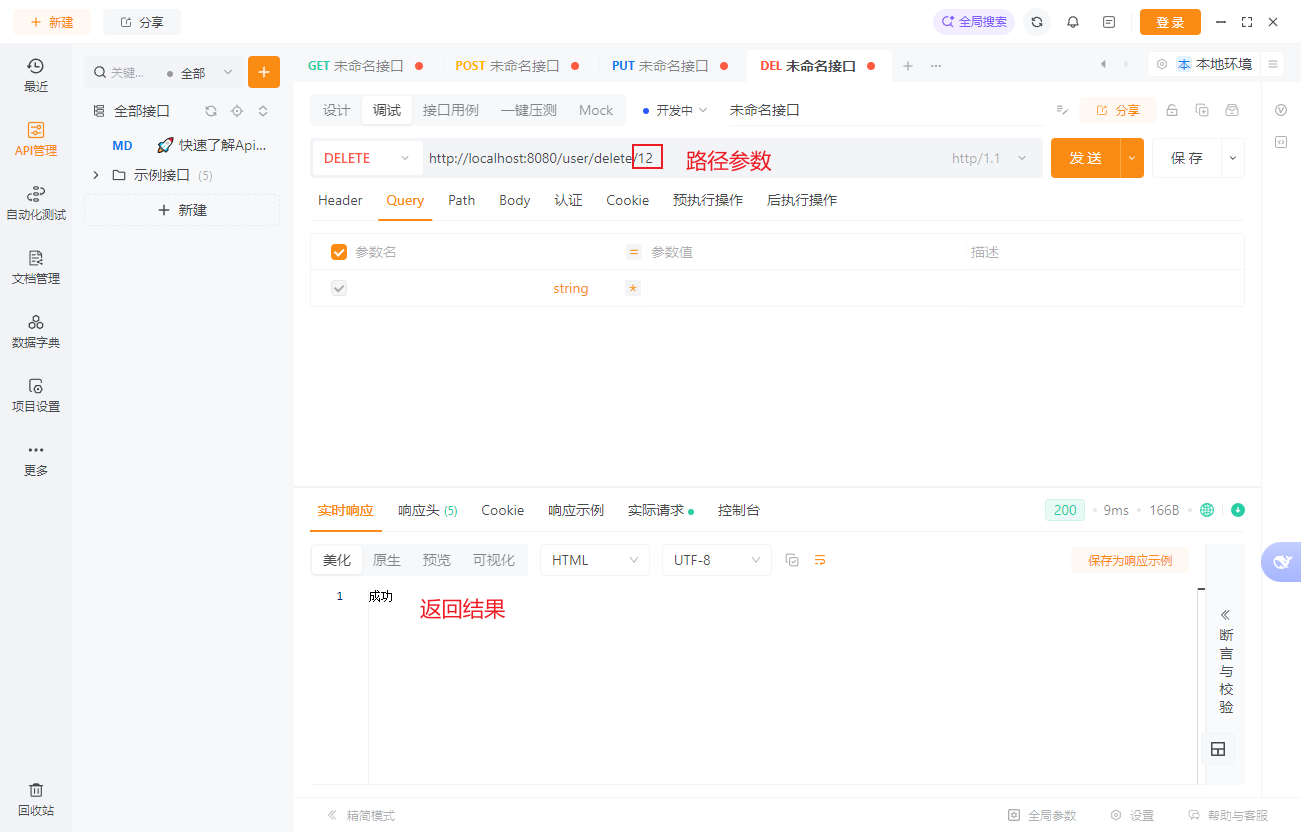
使用 apiPost 模拟发送数据
分页模糊查询数据
使用 pagehelper 分页插件
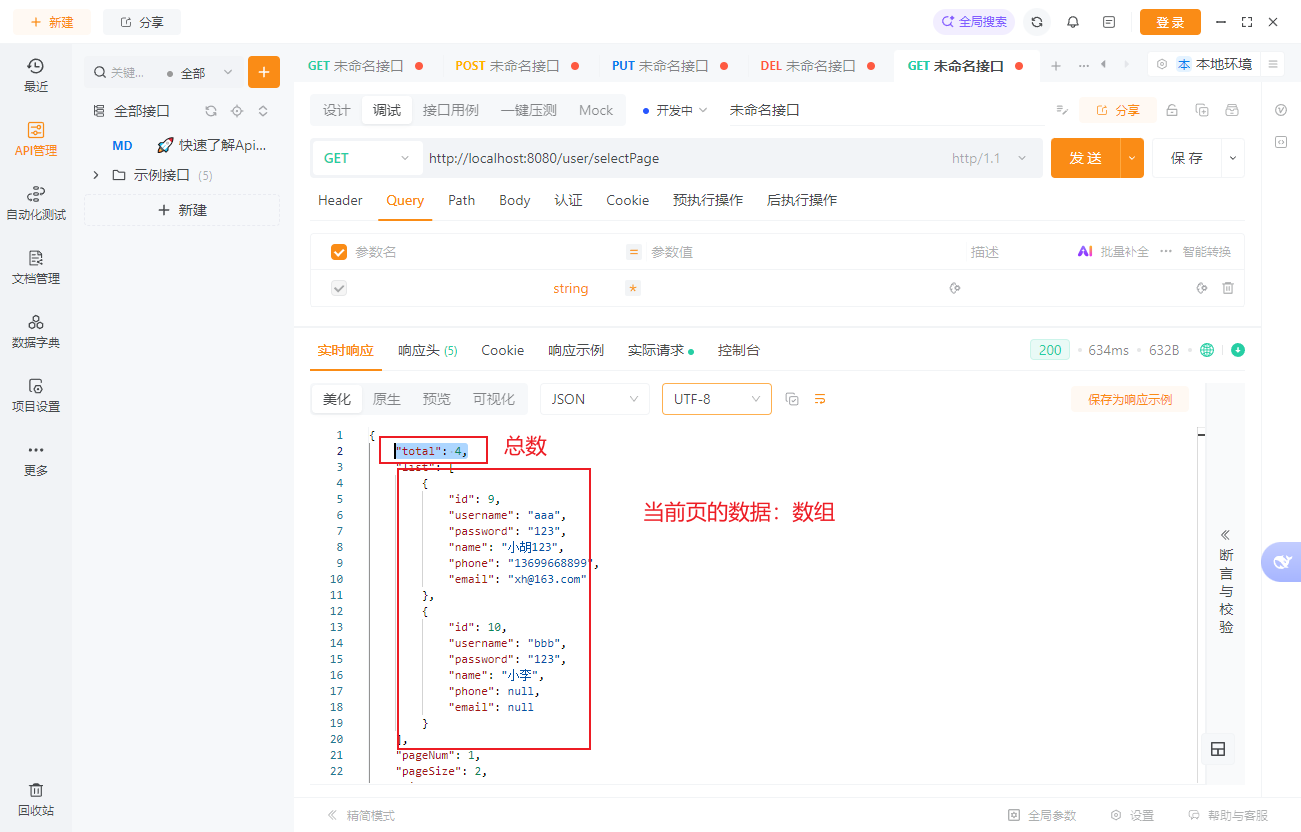
分页模糊查询的 Controller
/**
 * @param pageNum 当前的页码
 * @param pageSize 每页查询的个数
 * @return 分页数据:总数、页码、每页个数、当前页的数据JSON数组
 * /user/selectPage?pageNum=1&pageSize=10
 */
@GetMapping("/selectPage")
public ResponseEntity<PageInfo<User>> selectPage(@RequestParam(defaultValue = "1") Integer pageNum,
                                           @RequestParam(defaultValue = "2") Integer pageSize,
                                           @RequestParam(required = false) String name) {
    PageInfo<User> pageInfo = userService.selectPage(pageNum, pageSize, name);
    return new ResponseEntity<>(pageInfo, HttpStatus.OK);
}
Service
public PageInfo<User> selectPage(Integer pageNum, Integer pageSize, String name) {
    // 使用pagehelper进行分页查询
    PageHelper.startPage(pageNum, pageSize);
    List<User> userList = this.userMapper.selectByCondition(name);
    return PageInfo.of(userList);
}
Mapper.xml
<select id="selectByCondition" resultType="com.example.entity.User">
    select * from `user`
    <where>
     <if test="name != null">
         name like concat('%', #{name}, '%')
     </if>
    </where>
</select>
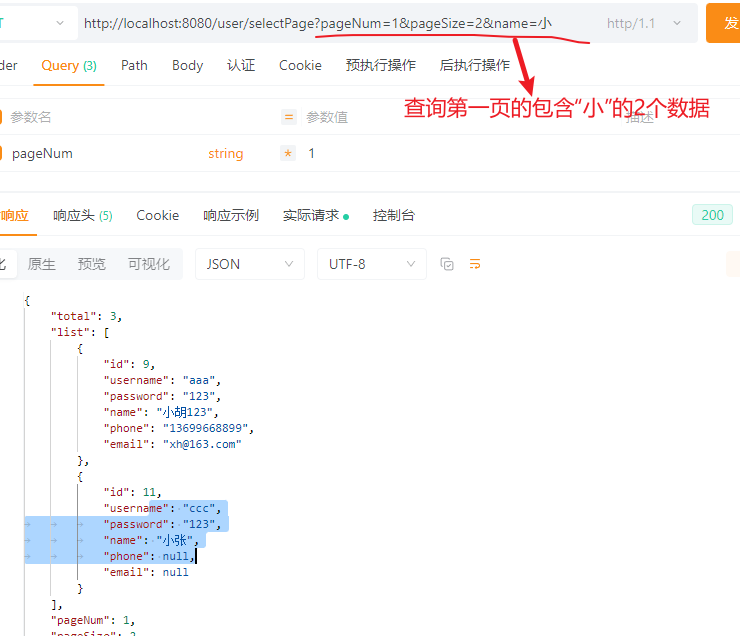
在 sql 里写模糊查询逻辑

使用 apiPost 请求数据
如果是 2 个或者更多的条件怎么办?
这个作为同学们思考的内容