13. SpringBoot+Vue实现单文件、多文件上传和下载
加一个全局的异常处理
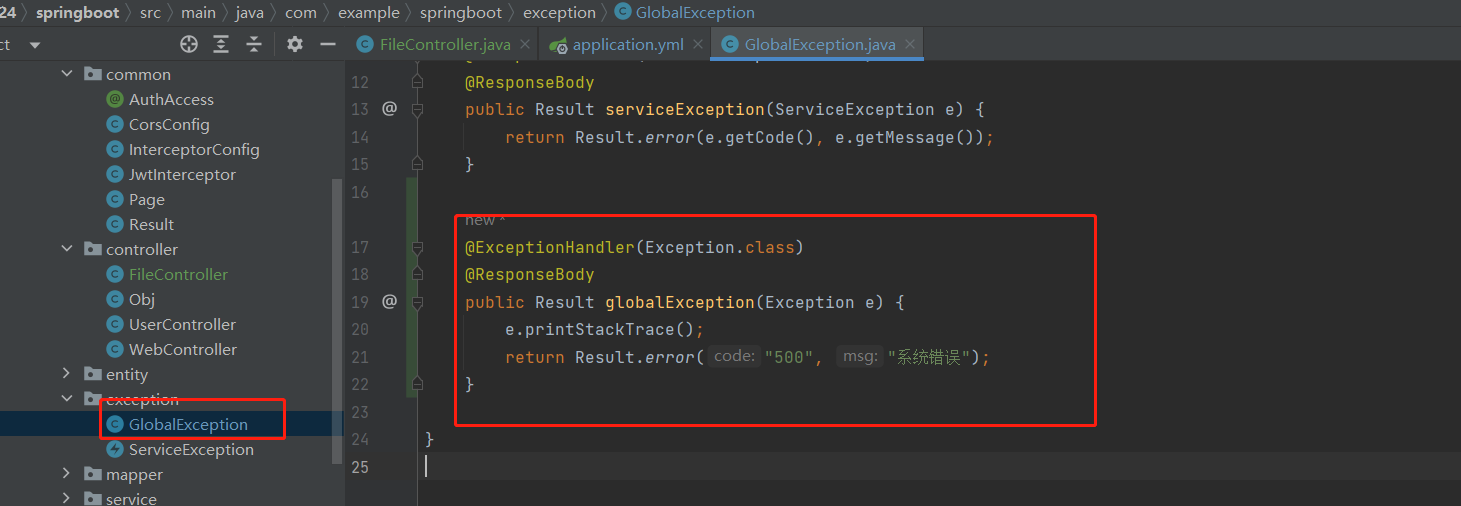
@ExceptionHandler(Exception.class)
@ResponseBody
public Result globalException(Exception e) {
    e.printStackTrace();
    return Result.error("500", "系统错误");
}
单文件上传
postman 请求
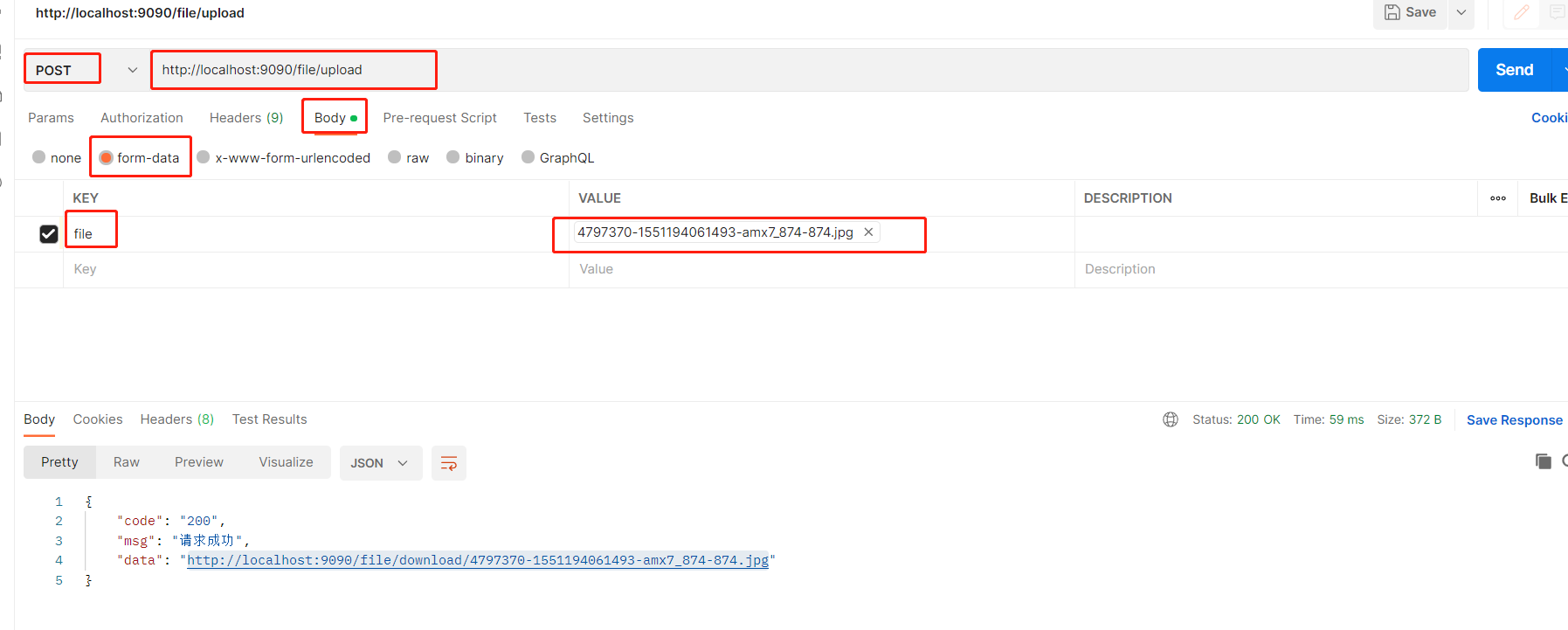
文件上传代码:
java
import cn.hutool.core.io.FileUtil;
import com.example.springboot.common.AuthAccess;
import com.example.springboot.common.Result;
import org.springframework.beans.factory.annotation.Value;
import org.springframework.web.bind.annotation.*;
import org.springframework.web.multipart.MultipartFile;

import javax.servlet.ServletOutputStream;
import javax.servlet.http.HttpServletResponse;
import java.io.File;
import java.io.IOException;
import java.net.URLEncoder;

@Value("${ip:localhost}")
String ip;

@Value("${server.port}")
String port;

private static final String ROOT_PATH =  System.getProperty("user.dir") + File.separator + "files";  // D:\B站\小白做毕设2024\代码\小白做毕设2024\files

@PostMapping("/upload")
public Result upload(MultipartFile file) throws IOException {
    String originalFilename = file.getOriginalFilename();  // 文件的原始名称
    // aaa.png
    String mainName = FileUtil.mainName(originalFilename);  // aaa
    String extName = FileUtil.extName(originalFilename);// png
    if (!FileUtil.exist(ROOT_PATH)) {
        FileUtil.mkdir(ROOT_PATH);  // 如果当前文件的父级目录不存在,就创建
    }
    if (FileUtil.exist(ROOT_PATH + File.separator + originalFilename)) {  // 如果当前上传的文件已经存在了,那么这个时候我就要重名一个文件名称
        originalFilename = System.currentTimeMillis() + "_" + mainName + "." + extName;
    }
    File saveFile = new File(ROOT_PATH + File.separator + originalFilename);
    file.transferTo(saveFile);  // 存储文件到本地的磁盘里面去
    String url = "http://" + ip + ":" + port + "/file/download/" + originalFilename;
    return Result.success(url);  //返回文件的链接,这个链接就是文件的下载地址,这个下载地址就是我的后台提供出来的
}
vue
获取用户信息:
user: JSON.parse(localStorage.getItem('honey-user') || '{}'),
文件上传组件代码
<el-upload
    action="http://localhost:9090/file/upload"
    :headers="{token: user.token}"
    :on-success="handleFileUpload"
>
  <el-button size="mini" type="primary">单文件上传</el-button>
</el-upload>
文件上传回调钩子
handleFileUpload(response, file, fileList) {
	console.log(response, file, fileList)
},
文件存储到后台,发送更新的请求
handleTableFileUpload(row, file, fileList) {
  console.log(row, file, fileList)
  row.avatar = file.response.data
  // this.$set(row, 'avatar', file.response.data)
  console.log(row)
  // 触发更新就可以了
  request.put('/user/update', row).then(res => {
    if (res.code === '200') {
      this.$message.success('上传成功')
    } else {
      this.$message.error(res.msg)
    }
  })
},
多文件上传
vue
<el-upload
      action="http://localhost:9090/file/upload"
      :headers="{token: user.token}"
      :on-success="handleMultipleFileUpload"
      multiple
  >
    <el-button size="mini" type="success">多文件上传</el-button>
  </el-upload>
  <el-button type="primary" style="margin:  10px 0" @click="showUrls">显示上传的链接</el-button>

</div>
handleMultipleFileUpload(response, file, fileList) {
  this.urls = fileList.map(v => v.response?.data)
},
文件下载
response.addHeader("Content-Disposition", "attachment;filename=" + URLEncoder.encode(fileFullName, "UTF-8")); // 附件下载
@AuthAccess
@GetMapping("/download/{fileName}")
public void download(@PathVariable String fileName, HttpServletResponse response) throws IOException {
    response.addHeader("Content-Disposition", "attachment;filename=" + URLEncoder.encode(fileFullName, "UTF-8"));  // 附件下载
    String filePath = ROOT_PATH  + File.separator + fileName;
    if (!FileUtil.exist(filePath)) {
        return;
    }
    byte[] bytes = FileUtil.readBytes(filePath);
    ServletOutputStream outputStream = response.getOutputStream();
    outputStream.write(bytes);  // 数组是一个字节数组,也就是文件的字节流数组
    outputStream.flush();
    outputStream.close();
}
文件预览
根据文件的类型区分的,一般是图片和 pdf 可以预览
response.addHeader("Content-Disposition", "inline;filename=" + URLEncoder.encode(fileFullName, "UTF-8")); // 预览
@AuthAccess
@GetMapping("/download/{fileName}")
public void download(@PathVariable String fileName, HttpServletResponse response) throws IOException {
    response.addHeader("Content-Disposition", "inline;filename=" + URLEncoder.encode(fileFullName, "UTF-8"));  // 预览
    String filePath = ROOT_PATH  + File.separator + fileName;
    if (!FileUtil.exist(filePath)) {
        return;
    }
    byte[] bytes = FileUtil.readBytes(filePath);
    ServletOutputStream outputStream = response.getOutputStream();
    outputStream.write(bytes);  // 数组是一个字节数组,也就是文件的字节流数组
    outputStream.flush();
    outputStream.close();
}