20. SpringBoot+Vue集成系统公告
设计表 notice
CREATE TABLE `notice` (
  `id` int(11) NOT NULL AUTO_INCREMENT,
  `title` varchar(255) COLLATE utf8mb4_unicode_ci DEFAULT NULL COMMENT '标题',
  `content` varchar(500) COLLATE utf8mb4_unicode_ci DEFAULT NULL COMMENT '内容',
  `userid` int(11) DEFAULT NULL COMMENT '发布人id',
  `time` varchar(255) COLLATE utf8mb4_unicode_ci DEFAULT NULL COMMENT '发布时间',
  `open` tinyint(1) DEFAULT '1' COMMENT '是否公开',
  PRIMARY KEY (`id`)
) ENGINE=InnoDB AUTO_INCREMENT=3 DEFAULT CHARSET=utf8mb4 COLLATE=utf8mb4_unicode_ci COMMENT='系统公告表';
后台 crud
Notice
package com.example.springboot.entity;

import com.baomidou.mybatisplus.annotation.IdType;
import com.baomidou.mybatisplus.annotation.TableField;
import com.baomidou.mybatisplus.annotation.TableId;
import lombok.Data;

@Data
public class Notice {
    @TableId(type= IdType.AUTO)
    private Integer id;
    private String title;
    private String content;
    private Integer userid;
    private String time;

    // 这个注解表示这个字段不在数据库表里  是用来做业务处理用的
    @TableField(exist = false)
    private String user;

}
NoticeController
package com.example.springboot.controller;

import cn.hutool.core.date.DateUtil;
import cn.hutool.core.util.StrUtil;
import com.baomidou.mybatisplus.core.conditions.query.QueryWrapper;
import com.baomidou.mybatisplus.extension.plugins.pagination.Page;
import com.example.springboot.common.Result;
import com.example.springboot.entity.Notice;
import com.example.springboot.entity.User;
import com.example.springboot.service.NoticeService;
import com.example.springboot.service.UserService;
import com.example.springboot.utils.TokenUtils;
import org.springframework.beans.factory.annotation.Autowired;
import org.springframework.web.bind.annotation.*;

import java.util.List;

@RestController
@RequestMapping("/notice")
public class NoticeController {

    @Autowired
    NoticeService noticeService;

    @Autowired
    UserService userService;

    /**
     * 新增信息
     */
    @PostMapping("/add")
    public Result add(@RequestBody Notice notice) {
        User currentUser = TokenUtils.getCurrentUser();  // 获取到当前登录的用户信息
        notice.setUserid(currentUser.getId());
        notice.setTime(DateUtil.now());  //   2023-09-12 21:09:12
        noticeService.save(notice);
        return Result.success();
    }

    /**
     * 修改信息
     */
    @PutMapping("/update")
    public Result update(@RequestBody Notice notice) {
        noticeService.updateById(notice);
        return Result.success();
    }

    /**
     * 删除信息
     */
    @DeleteMapping("/delete/{id}")
    public Result delete(@PathVariable Integer id) {
        noticeService.removeById(id);
        return Result.success();
    }


    /**
     * 批量删除信息
     */
    @DeleteMapping("/delete/batch")
    public Result batchDelete(@RequestBody List<Integer> ids) {
        noticeService.removeBatchByIds(ids);
        return Result.success();
    }

    /**
     * 查询全部信息
     */
    @GetMapping("/selectAll")
    public Result selectAll() {
        List<Notice> userList = noticeService.list(new QueryWrapper<Notice>().orderByDesc("id"));
        return Result.success(userList);
    }

    /**
     * 根据ID查询信息
     */
    @GetMapping("/selectById/{id}")
    public Result selectById(@PathVariable Integer id) {
        Notice notice = noticeService.getById(id);
        User user = userService.getById(notice.getUserid());
        if (user != null) {
            notice.setUser(user.getName());
        }
        return Result.success(notice);
    }


    /**
     * 多条件模糊查询信息
     * pageNum 当前的页码
     * pageSize 每页查询的个数
     */
    @GetMapping("/selectByPage")
    public Result selectByPage(@RequestParam Integer pageNum,
                               @RequestParam Integer pageSize,
                               @RequestParam String title) {
        QueryWrapper<Notice> queryWrapper = new QueryWrapper<Notice>().orderByDesc("id");  // 默认倒序,让最新的数据在最上面
        queryWrapper.like(StrUtil.isNotBlank(title), "title", title);
        Page<Notice> page = noticeService.page(new Page<>(pageNum, pageSize), queryWrapper);
        List<Notice> records = page.getRecords();
//        List<User> list = userService.list();
        for (Notice record : records) {
            Integer authorid = record.getUserid();
            User user = userService.getById(authorid);
//            String author = list.stream().filter(u -> u.getId().equals(authorid)).findFirst().map(User::getName).orElse("");
            if (user != null) {
                record.setUser(user.getName());
            }
        }
        return Result.success(page);
    }


}
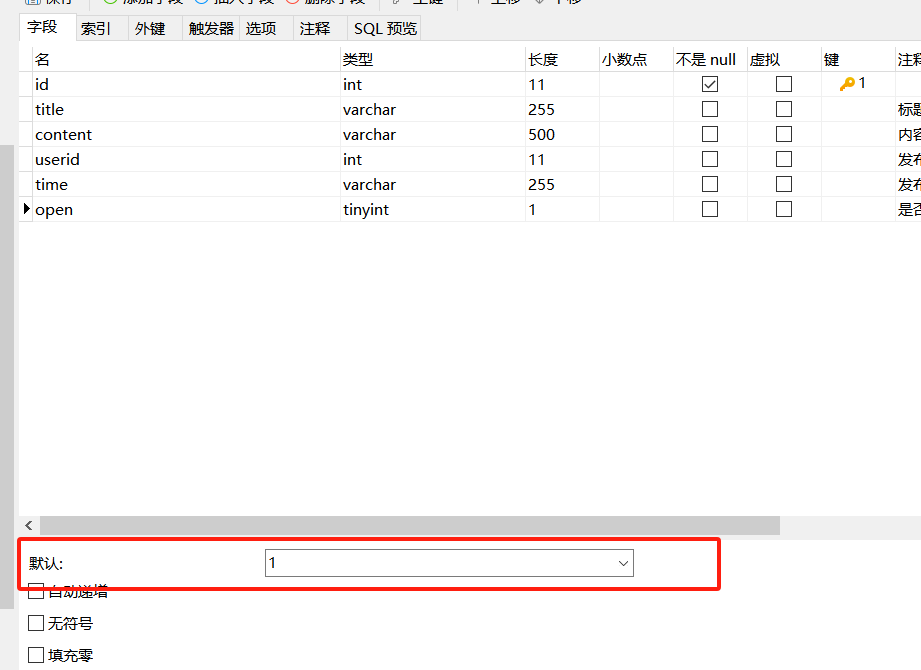
怎么设置字段的默认值?
在数据库设置即可
前台 vue
Notice.vue
<template>
  <div>
    <div>
      <el-input style="width: 200px" placeholder="查询标题" v-model="title"></el-input>
      <el-button type="primary" style="margin-left: 10px" @click="load(1)">查询</el-button>
      <el-button type="info" @click="reset">重置</el-button>
    </div>
    <div style="margin: 10px 0">
      <el-button type="primary" plain @click="handleAdd">新增</el-button>
      <el-button type="danger" plain @click="delBatch">批量删除</el-button>
    </div>
    <el-table :data="tableData" stripe :header-cell-style="{ backgroundColor: 'aliceblue', color: '#666' }" @selection-change="handleSelectionChange">
      <el-table-column type="selection" width="55" align="center"></el-table-column>
      <el-table-column prop="id" label="序号" width="70" align="center"></el-table-column>
      <el-table-column prop="title" label="标题"></el-table-column>
      <el-table-column prop="content" label="内容" show-overflow-tooltip></el-table-column>
      <el-table-column prop="user" label="发布人"></el-table-column>
      <el-table-column prop="time" label="发布时间"></el-table-column>
      <el-table-column label="是否公开">
        <template v-slot="scope">
          <el-switch v-model="scope.row.open" @change="changeOpen(scope.row)"></el-switch>
        </template>
      </el-table-column>
      <el-table-column label="操作" align="center" width="180">
        <template v-slot="scope">
          <el-button size="mini" type="primary" plain @click="handleEdit(scope.row)">编辑</el-button>
          <el-button size="mini" type="danger" plain @click="del(scope.row.id)">删除</el-button>
        </template>
      </el-table-column>
    </el-table>

    <div style="margin: 10px 0">
      <el-pagination
          @current-change="handleCurrentChange"
          :current-page="pageNum"
          :page-size="pageSize"
          layout="total, prev, pager, next"
          :total="total">
      </el-pagination>
    </div>

    <el-dialog title="公告信息" :visible.sync="fromVisible" width="40%" :close-on-click-modal="false">
      <el-form :model="form" label-width="80px" style="padding-right: 20px" :rules="rules" ref="formRef">
        <el-form-item label="标题" prop="title">
          <el-input v-model="form.title" placeholder="标题"></el-input>
        </el-form-item>
        <el-form-item label="内容" prop="content">
          <el-input type="textarea" v-model="form.content" placeholder="内容"></el-input>
        </el-form-item>
      </el-form>

      <div slot="footer" class="dialog-footer">
        <el-button @click="fromVisible = false">取 消</el-button>
        <el-button type="primary" @click="save">确 定</el-button>
      </div>
    </el-dialog>

  </div>
</template>

<script>

export default {
  name: "Notice",
  data() {
    return {
      tableData: [],  // 所有的数据
      pageNum: 1,   // 当前的页码
      pageSize: 5,  // 每页显示的个数
      username: '',
      title: '',
      total: 0,
      fromVisible: false,
      form: {},
      user: JSON.parse(localStorage.getItem('honey-user') || '{}'),
      rules: {
        title: [
          { required: true, message: '请输入标题', trigger: 'blur' },
        ],
        content: [
          { required: true, message: '请输入内容', trigger: 'blur' },
        ]
      },
      ids: [],
      content: '',
    }
  },
  created() {
    this.load()
  },
  methods: {
    changeOpen(form) {
      // 调用更新的接口  更新数据到数据库
      this.form = JSON.parse(JSON.stringify(form))
      this.sendSaveRequest()   // 直接发请求就可以了
    },
    delBatch() {
      if (!this.ids.length) {
        this.$message.warning('请选择数据')
        return
      }
      this.$confirm('您确认批量删除这些数据吗?', '确认删除', {type: "warning"}).then(response => {
        this.$request.delete('/notice/delete/batch', { data: this.ids }).then(res => {
          if (res.code === '200') {   // 表示操作成功
            this.$message.success('操作成功')
            this.load(1)
          } else {
            this.$message.error(res.msg)  // 弹出错误的信息
          }
        })
      }).catch(() => {})
    },
    handleSelectionChange(rows) {   // 当前选中的所有的行数据
      this.ids = rows.map(v => v.id)
    },
    del(id) {
      this.$confirm('您确认删除吗?', '确认删除', {type: "warning"}).then(response => {
        this.$request.delete('/notice/delete/' + id).then(res => {
          if (res.code === '200') {   // 表示操作成功
            this.$message.success('操作成功')
            this.load(1)
          } else {
            this.$message.error(res.msg)  // 弹出错误的信息
          }
        })
      }).catch(() => {})
    },
    handleEdit(row) {   // 编辑数据
      this.form = JSON.parse(JSON.stringify(row))  // 给form对象赋值  注意要深拷贝数据
      this.fromVisible = true   // 打开弹窗
    },
    handleAdd() {   // 新增数据
      this.form = {}  // 新增数据的时候清空数据
      this.fromVisible = true   // 打开弹窗
    },
    save() {   // 保存按钮触发的逻辑  它会触发新增或者更新
      this.$refs.formRef.validate((valid) => {
        if (valid) {
          this.sendSaveRequest()
        }
      })
    },
    sendSaveRequest() {
      this.$request({
        url: this.form.id ? '/notice/update': '/notice/add',
        method: this.form.id ? 'PUT' : 'POST',
        data: this.form
      }).then(res => {
        if (res.code === '200') {  // 表示成功保存
          this.$message.success('保存成功')
          this.load(1)
          this.fromVisible = false
        } else {
          this.$message.error(res.msg)  // 弹出错误的信息
        }
      })
    },
    reset() {
      this.title = ''
      this.load()
    },
    load(pageNum) {  // 分页查询
      if (pageNum)  this.pageNum = pageNum
      this.$request.get('/notice/selectByPage', {
        params: {
          pageNum: this.pageNum,
          pageSize: this.pageSize,
          title: this.title
        }
      }).then(res => {
        this.tableData = res.data.records
        this.total = res.data.total
      })
    },
    handleCurrentChange(pageNum) {
      this.load(pageNum)
    },
  }
}
</script>

<style>
.el-tooltip__popper{ max-width:300px !important; }
</style>
Home.vue
<template>
  <div>
    <div style="box-shadow: 0 0 10px rgba(0,0,0,.1); padding: 10px 20px; border-radius: 5px; margin-bottom: 10px">
      早安,{{ user.name }},祝你开心每一天!
    </div>

    <div style="display: flex">
      <el-card style="width: 100%;">
        <div slot="header" class="clearfix">
          <span>青哥哥带你做毕设2024</span>
        </div>
        <div>
          2024毕设正式开始了!青哥哥带你手把手敲出来!
          <div style="margin-top: 20px">
            <div style="margin: 10px 0"><strong>主题色</strong></div>
            <el-button type="primary">按钮</el-button>
            <el-button type="success">按钮</el-button>
            <el-button type="warning">按钮</el-button>
            <el-button type="danger">按钮</el-button>
            <el-button type="info">按钮</el-button>
          </div>
        </div>
      </el-card>
    </div>

    <div style="display: flex; margin: 15px 0">
      <el-card style="width: 50%; margin-right: 10px">
        <div style="margin-bottom: 15px; font-size: 20px; font-weight: bold">系统公告</div>
        <el-timeline style="padding: 0">
          <el-timeline-item v-for="item in notices" :key="item.id" :timestamp="item.time" placement="top">
            <el-card>
              <h4>{{ item.title }}</h4>
              <p>{{ item.content }}</p>
            </el-card>
          </el-timeline-item>
        </el-timeline>
      </el-card>

      <el-card style="width: 50%">
        <div style="margin-bottom: 15px; font-size: 20px; font-weight: bold">系统公告</div>
        <el-collapse v-model="activeName" accordion>
          <el-collapse-item  v-for="(item, index) in notices" :key="item.id" :name="index + ''">
            <template slot="title">
              <h4>{{ item.title }}</h4>
            </template>
            <div>{{ item.content }}</div>
          </el-collapse-item>
        </el-collapse>
      </el-card>
    </div>

  </div>
</template>

<script>
export default {
  name: "Home",
  data() {
    return {
      user: JSON.parse(localStorage.getItem('honey-user') || '{}'),
      notices: [],
      activeName: '0'
    }
  },
  created() {
    this.loadNotice()
  },
  methods: {
    loadNotice() {
      this.$request.get('/notice/selectUserData').then(res => {
        this.notices = res.data
      })
    }
  }
}
</script>

<style scoped>

</style>